

Event planning is no longer just about booking a venue and setting up a basic registration form. Today's corporate events, global summits, and multi-track conferences are complex, data-driven brand activations. To run them successfully, event teams need a centralized, secure, and reliable digital ecosystem that can handle thousands of attendees, coordinate complex speaker tracks, manage sponsors, and prove return on investment (ROI).
Yet, finding the best event management software for your organization's needs can feel overwhelming. The market is filled with legacy platforms, modern all-in-one tools, and niche event planning software. A single poor choice can lead to delayed setup, system crashes under heavy usage, unexpected pricing increases, or poor customer support when you need it most.
To help you make an informed decision, this comprehensive buyer's guide analyzes the leading event management solutions. We compare the best event management platform options on the market today across five key strategic pillars:
- Product Feature Completeness: The breadth and depth of native capabilities.
- Product Quality & Technical Usability: UI speed, customizability, and onsite reliability.
- User Reviews & Market Sentiment: G2/Capterra data and real organizer feedback.
- Pricing & Total Cost of Ownership (TCO): Platform licensing fees, usage tiers, and hidden costs.
- Customer Support Infrastructure: Onsite services, response times, and customer success terms.
Table of Contents
Pillar 1: Product Feature Completeness
A complete event platform should serve as a centralized hub for the entire event lifecycle. The core requirements for modern events include flexible registration builders, automated email flows, native badge design, secure virtual broadcasting, and sponsor-retrieval options.
Enterprise event management platforms such as Cvent, Whova, and RainFocus offer some of the most comprehensive solutions for managing conferences, trade shows, and large scale events.
Cvent is best known for its extensive Supplier Network, which enables event planners to source and connect with more than 300,000 venues and service providers worldwide. This makes it a strong choice for organizations that need venue sourcing and event procurement capabilities.
Whova, originally recognized for its highly rated event app and attendee engagement tools, has expanded into a full featured event management software. Its capabilities now span the entire event lifecycle, including event registration, abstract management, agenda planning, project management, attendee engagement, and post event reporting.
RainFocus is particularly strong in data management and personalization for enterprise events. The platform specializes in handling complex event data and delivering personalized session recommendations, making it well suited for large conferences with multiple tracks, diverse attendee interests, and extensive content catalogs.
Mid-market platforms balance these capabilities with more focused, user-friendly tools. Swoogo focuses on customizable registration forms and attendee paths. InEvent stands out for its native onsite check-in tools, Zebra printing integrations, and built-in "Live Studio" broadcasting suite. Whova and Swapcard focus heavily on attendee engagement, offering built-in community boards, social feeds, and AI-driven networking recommendations.
| Platform | Registration & Ticketing | Onsite Check-In & Badge Printing | Virtual & Hybrid Delivery | Attendee Networking & AI Matchmaking | Abstract & Speaker Management | Sponsor & Exhibitor Portals |
| Cvent | Advanced; custom registration paths and waitlist logic. | Native; OnArrival app, self-service kiosk check-in. | Native; integrated Attendee Hub module. | Basic; attendee directory and 1:1 messaging. | Advanced; centralized database and call for papers. | Advanced; portal with lead retrieval. |
| Whova | Native; customizable registration forms and ticketing options. | Native; kiosk check-in and on-demand badge generation. | Integrated; session livestream. | Leading; attendee matchmaking, meetups, community boards. | Robust; academic abstract submissions and speaker management. | Advanced; exhibitor and sponsor portals with lead retrieval. |
| Bizzabo | Native; customizable branded forms. | Native; Klik SmartBadge wearable integration. | Native; virtual event lobby with streaming. | Advanced; AI-powered matchmaking. | Native; multi-track agenda workflows. | Advanced; real-time ROI analytics. |
| Swoogo | Best-in-class; conditional registration logic. | Basic; relies on external partner integrations. | Basic; Zoom webinar automation hooks. | Basic; attendee directories. | Robust; speaker portals. | Basic; custom web pages. |
| vFairs | Native; flexible checkout integrations. | Native; badge printing tools. | Leading; 3D virtual environment with booths. | Advanced; chat, audio/video, AI matches. | Native; call for papers and review portals. | Advanced; 3D exhibitor booths. |
| InEvent | Advanced; AI registration builder. | Leading; Zebra SDK, facial recognition. | Leading; Live Studio broadcast feature. | Advanced; 1:1 video chat and lobbies. | Robust; dynamic agenda builder. | Native; lead retrieval booths. |
| Eventbrite | Simple; public ticketing engine. | Basic; mobile check-in app. | Limited; external streaming links. | None; direct chat not supported. | None; manual agenda uploads | None; simple logo placement |
| Webex Events | Branded; registration workflows. | Native; badge design & print. | Robust; RTMP stream hosting. | Good; in-app gamification. | Robust; session calendar. | Good; banner ads, virtual halls. |
| Swapcard | Unified; attendee + exhibitor registration. | Native; onsite registration. | Native; video player lobbies. | Leading; behavioral matchmaking engine. | Robust; speaker profiles. | Best-in-class; monetization portal. |
| RainFocus | Deeply configurable workflows. | Requires third-party hardware. | Robust; streaming & sessions. | Advanced; behavior matchmaking. | Leading; personalized portals. | Advanced; lead capture systems. |
| EventsAir | Highly complex multi-tier rules. | Native; onsite badge printing. | Native; OnAir virtual studio. | Robust; live Q&A, chat polls. | Advanced; abstract reviews. | Advanced; dedicated portals. |
| Splash | Good; drag-and-drop builder. | Native; check-in & label printing. | Basic; external streaming hooks. | Basic; no advanced matchmaking. | Basic; standard calendar listing. | Basic; standard sponsor blocks |
| Eventzilla | Good; conditional RSVP fields. | Basic; mobile check-in app. | Basic; virtual meeting hooks. | Basic; standard attendee list. | Limited; basic scheduling tools | Basic; sponsor logo displays |
| Dryfta | Integrated registration and payments. | Yes; native check-in apps. | Yes; virtual/hybrid event portals. | Basic; standard attendee list | Advanced; abstract submission and reviews. | Basic; sponsor logos |
| SpotMe | Integrated; basic workflows. | Native; mobile checking | Robust; regulated hybrid lobbies. | Advanced; targeted professional chats. | Robust; speaker profiles | Good; compliance-approved pages. |
| eShow | Advanced; multi-tier workflows. | Native; badge setup and print. | Basic; virtual lobbies | Basic; standard directory | Robust; paper submissions. | Advanced; floor plan manager. |
Pillar 2: Product Quality, Technical Usability, and Operational Reliability
The quality of an event management software is truly tested during live, high-traffic scenarios. When thousands of attendees check in simultaneously or tune in to a live stream, the software's architecture and reliability become critical.
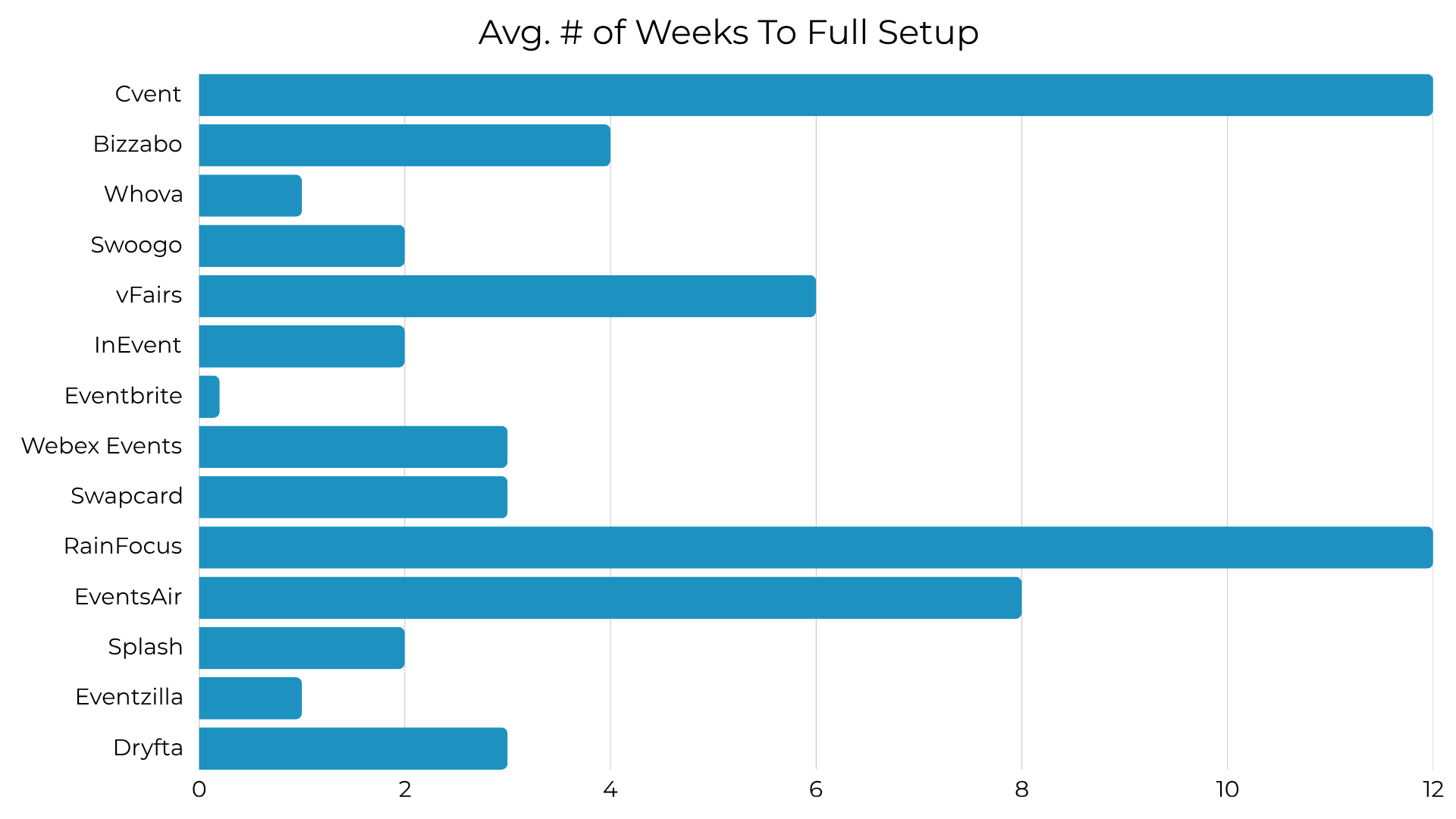
Customization and Onboarding Speed
Legacy enterprise platforms like Cvent and RainFocus allow organizations to customize nearly every workflow. However, this high level of flexibility comes with a steep learning curve and long onboarding times, often taking several months.
By contrast, agile mid-market tools like Swoogo, Splash, and Whova feature intuitive website builders and quick setup wizards. These allow non-technical teams to design and publish professional event pages in a matter of days.
Security, Hosting, and Network Stability
For enterprise and government planners, data security is non-negotiable. Leading platforms manage participant data securely, complying with SOC 2 Type II, ISO 27001, and GDPR standards.
Another key factor is how the software performs during onsite network issues. Completely web-based apps depend heavily on a continuous internet connection. If a venue's WiFi drops or gets overloaded, real-time social feeds, attendee check-ins, and dynamic updates can lag or fail entirely.
To protect against this, platforms like InEvent use native local database synchronization. This allows scanning and registration check-in devices to continue running offline, syncing back to the cloud automatically once the connection is restored. Meanwhile, Webex Events relies on Cisco's highly secure global infrastructure, offering a reliable choice for teams already using the Cisco ecosystem.
| Platform | Admin Interface Usability | Average Deployment Timeline | Mobile Integration Quality | Infrastructure Risk & Network Dependencies |
| Cvent | Complex; legacy database structure; requires specialized training. | 12 to 24 weeks; requires intensive onboarding. | Robust; OnArrival app is fast and reliable. | Frequent platform bugs; system lag during heavy concurrent use. |
| Bizzabo | Modern; intuitive marketing and data dashboards. | 4 to 8 weeks; moderate learning curve. | Excellent; wearable Bluetooth badge tracking is highly stable. | Limited offline capability; slow rollout of native AI features. |
| Whova | Highly accessible; setup process designed for non-technical users. | 1 to 2 weeks; rapid self setup launch. | Popular; high attendee engagement | Cloud reliance; web-based dashboard fails under poor venue WiFi. |
| Swoogo | Clean; modern; easy drag-and-drop system. | 2 to 4 weeks; low administrative overhead. | Limited; web-app format lacks a strong native mobile application. | Mobile responsive rendering bugs; limited reporting customization. |
| vFairs | Complex; requires dedicated project managers to build out spaces. | 6 to 8 weeks; guided by a dedicated support rep. | Moderate; mobile application is less polished than its desktop counterpart. | High graphic load requirements; virtual attendee learning curves. |
| InEvent | Modern; dashboard centralizes control without requiring a tech degree. | 2 to 3 weeks; sandbox environment facilitates testing. | Robust; custom white-labeled iOS/Android apps. | Requires high-quality local servers to run facial recognition. |
| Eventbrite | Simple; standard interface designed for immediate launch. | 1 day; instant self-service setup. | Highly stable; basic checkout and ticket-scanning app. | Minimal design customization; reporting lacks deep pipeline data. |
| Webex Events | Intuitive; designed specifically to sync with Cisco workflows. | 3 to 6 weeks; standard enterprise timeline. | Excellent; native app has very high performance. | Heavily dependent on Webex ecosystem for optimal stream performance. |
| Swapcard | Clean; modern; registration maps directly to app profiles. | 3 to 5 weeks; straightforward setup. | Outstanding; attendee adoption regularly exceeds 70%. | High reliance on continuous user interactions to train matchmaking AI. |
| RainFocus | Complex; highly granular configuration required. | 12 to 24 weeks; extensive professional services required. | Good; RainFocus Mobile is functional but less emphasized. | Long deployment delays; customization blockades require support team. |
| EventsAir | Highly structured; legacy navigation with complex menus. | 8 to 12 weeks; thorough onboarding required. | Moderate; native app is highly functional but lacks visual polish. | Web client is slower and less stable than the desktop version. |
| Splash | Visually polished; template-driven design editor. | 2 to 3 weeks; fast design cycles. | Good; basic ticket-scanning and check-in performance. | Weak data segmentation options; lacks complex multi-session support. |
| Eventzilla | Clean; straightforward with minimal visual clutter. | 1 to 2 weeks; fast template setup. | Simple; check-in and entry-level engagement. | Limited advanced formatting; payment gateway integration bugs. |
| Dryfta | Academic-focused; specialized but less visually modern. | 3 to 6 weeks; requires manual import configurations. | Good; academic session schedules update reliably. | Relies heavily on accurate CSV formatting for bulk uploads. |
Pillar 3: User Reviews and Ratings
Analyzing user ratings on platforms like G2 and Capterra helps identify patterns of customer satisfaction and common software issues.
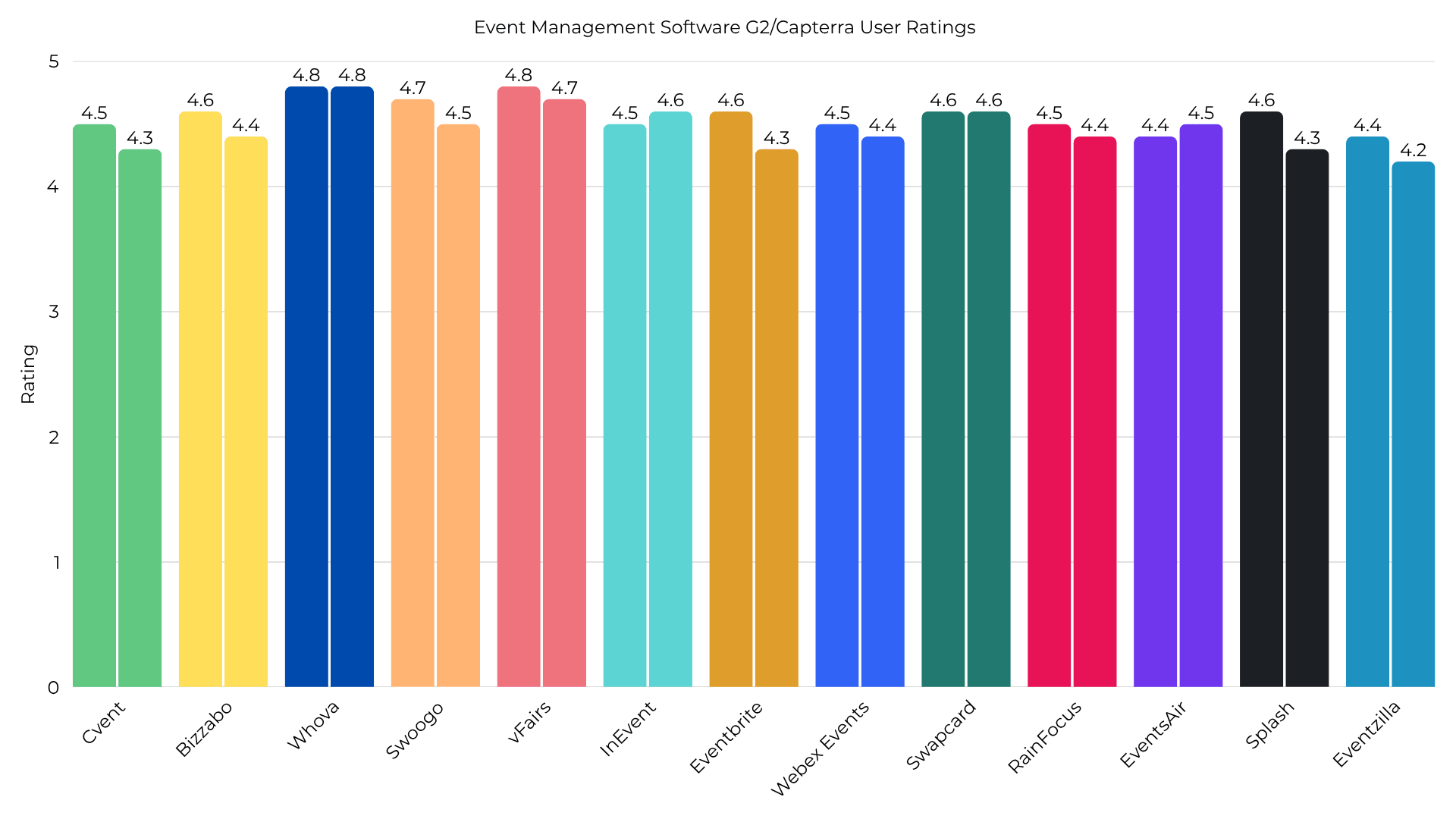
User Sentiment Trends
While high ratings are a good sign, they often hide specific user frustrations. For example, Whova holds an impressive 4.8/5 rating on both G2 and Capterra, with users highly praising its simple setup and networking features. However, negative reviews consistently mention that the volume of push notifications can be overwhelming and the mobile user interface can feel cluttered during large events.
Similarly, vFairs holds a strong G2 rating for its dedicated support and interactive 3D virtual spaces. Despite this, some users note a steep administrative learning curve and occasional bugs when setting up custom agendas.
For legacy enterprise systems like Cvent, user feedback is often more divided. Cvent holds a 4.5/5 rating on Capterra, with planners valuing its reliability, check-in tools, and professional onsite hardware support. However, a significant number of negative reviews highlight complex and unexpected fee structures, clunky interfaces, and invoicing issues, such as being charged for unused equipment.
On the other hand, newer, more agile platforms like Swoogo and InEvent receive consistent praise for their modern, user-friendly layouts and rapid setup times, showing that the market is shifting toward more user-focused designs.
| Platform | G2 Rating | Capterra Rating | Primary User-Reported Strengths | Primary User-Reported Weaknesses |
| Cvent | 4.3 / 5 | 4.5 / 5 | Highly reliable for massive scale; rapid onsite badge scanning. | High costs; complex pricing; steep admin learning curve. |
| Bizzabo | 4.4 / 5 | 4.6 / 5 | Modern interface; Klik smart badges boost corporate sponsor ROI; reliable CRM integrations. | High starting costs; lack of local offline capabilities; slower rollout of AI tools. |
| Whova | 4.8 / 5 | 4.8 / 5 | Outstanding attendee networking; popular social walls; simple session tracking; easy to use. | Overwhelming notification volume; cluttered mobile app screens; app performance lags on slow WiFi. |
| Swoogo | 4.5 / 5 | 4.7 / 5 | Clean admin design; very powerful conditional logic; highly responsive support. | Expensive for small businesses; limited built-in networking tools; mobile web app formatting bugs. |
| vFairs | 4.7 / 5 | 4.8 / 5 | Immersive virtual lobbies; helpful dedicated project managers assigned to events. | Complex administrative configuration; mobile app is less polished than desktop version. |
| InEvent | 4.6 / 5 | 4.5 / 5 | Clean, straightforward setup; native badge printing without third-party middleware. | Setup can be complex for small teams; reporting module requires manual filters. |
| Eventbrite | 4.3 / 5 | 4.6 / 5 | Strong public marketplace visibility; simple ticket sales; reliable free tier. | High per-ticket transaction fees; limited design options; lack of deep marketing data. |
| Webex Events | 4.4 / 5 | 4.5 / 5 | Secure hosting; seamless integration with Cisco and Webex equipment. | Complex configuration; limited landing page styling; poor non-Cisco support. |
| Swapcard | 4.6 / 5 | 4.6 / 5 | Highly effective AI matchmaking engine; great lead capture tools for exhibitors. | Pricey for smaller events; setup can be complex for basic ticketing needs. |
| RainFocus | 4.4 / 5 | 4.5 / 5 | Exceptional data scale; behavior-based attendee scoring; highly configurable. | Long onboarding process; custom changes require contacting support; very expensive. |
| EventsAir | 4.5 / 5 | 4.4 / 5 | Extremely secure; robust database; excellent for academic abstract reviews. | Steep learning curve; clunky web client; confusing invoicing workflows. |
| Splash | 4.3 / 5 | 4.6 / 5 | Beautiful, highly customizable templates; seamless Salesforce integration; easy email tracking. | High starting cost; limited multi-session logic; poor onsite badge design tools. |
| Eventzilla | 4.2 / 5 | 4.4 / 5 | Clean interface; affordable flat fee; robust conditional ticketing logic. | Limited custom branding; payment gateway bugs; basic reporting features. |
Pillar 4: Pricing Models and Total Cost of Ownership
Pricing models in the event technology sector vary widely, and contract complexity can make long-term budgeting a challenge. Planners must evaluate annual platform subscriptions, per-registration fees, percentage-based ticket sales, and premium add-ons to understand their actual total cost of ownership (TCO).
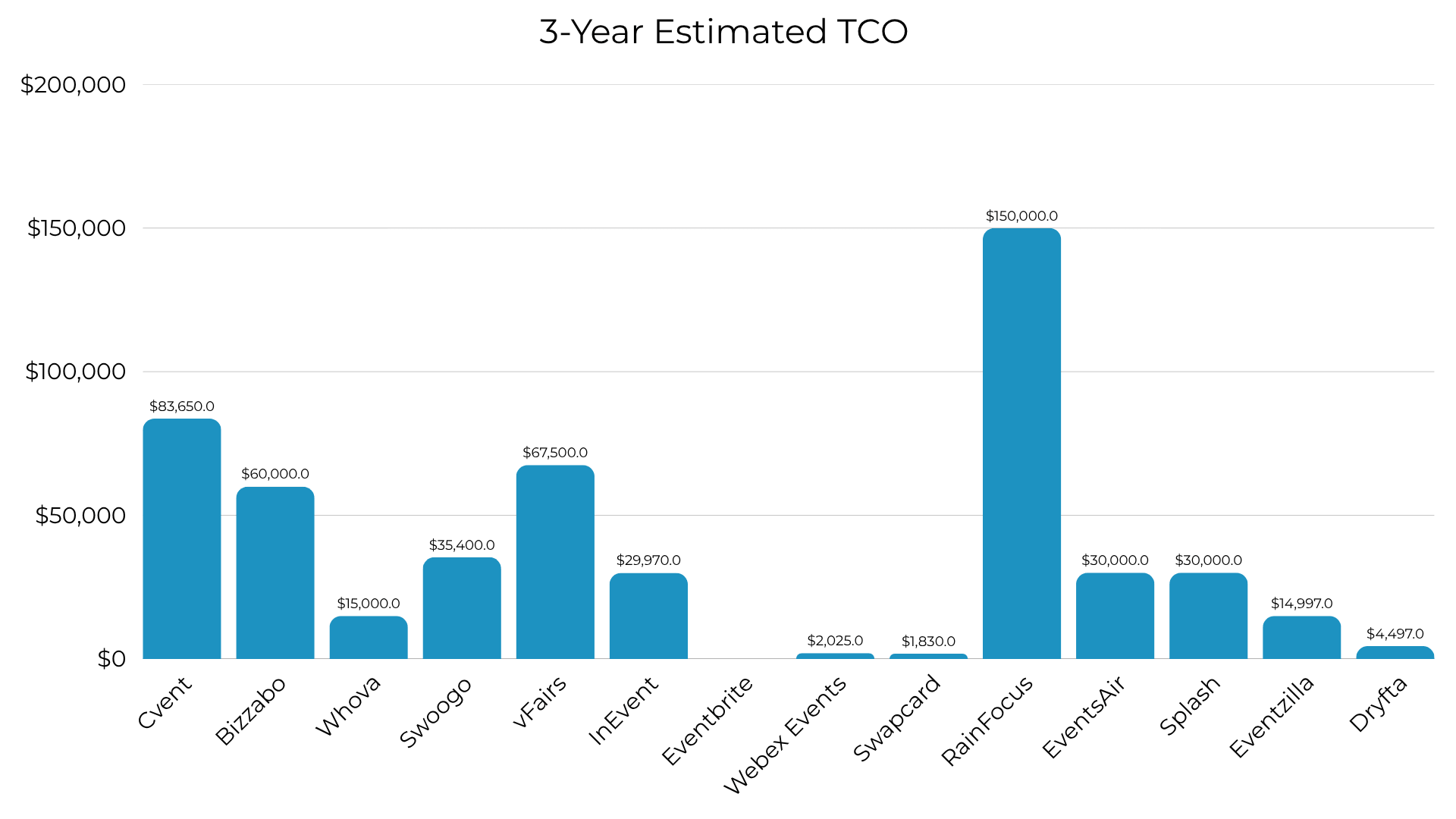
Note: Eventbrite can be used completely free but prices vary depending on registration fees
The Mechanics of Legally Binding Cost Layers
Legacy enterprise platforms typically use multi-layered pricing models. For example, Cvent's pricing includes a base annual platform fee (averaging $19,550 to $79,000) , but also adds several variable costs :
- Per-registrant fees ranging from $7 to $12.
- Attendee Hub engagement modules at $7 per registration.
- Implementation and onboarding services costing between $5,000 and $50,000 in the first year.
For a company running four events a year with 2,000 attendees each, these additional fees can push the first-year cost to nearly $100,000. RainFocus and vFairs use a similar approach, with custom-quoted annual costs typically starting around $22,500 and scaling up to $90,000 depending on attendee volume and custom work.
Alternative and Transactional Pricing Models
To offer more predictable costs, several modern platforms have introduced simplified pricing models. Swoogo charges a flat annual subscription starting at $11,800 per user, which includes unlimited registrations and events, making budgeting highly predictable. InEvent uses a modular approach, offering flat annual models starting at $9,990, as well as a flexible pay-per-registration model where unused credits never expire.
For smaller or public-facing events, commission-based models remain common. Eventbrite charges no upfront licensing fees but takes 3.7% plus $1.79 of every paid ticket, in addition to standard payment processing fees. While this is a low-risk option for free or small events, the cost can grow quickly as ticket sales increase, leading some planners to seek flat-fee alternatives like Ticket Tailor, which charges $0.85 per ticket.
| Platform | Core Pricing Model | Entry Pricing / Starting Cost | Per-Registrant / Ticket Fees | Onboarding & Setup Fees | 3-Year Estimated TCO |
| Cvent | Annual license + usage fees. | ~$19,550 / year (base license). | $7 to $12 per registration; $7 for Attendee Hub. | $5,000 to $50,000 (Year 1). | $83,650 to $313,000+. |
| Bizzabo | Annual subscription. | ~$17,999 / year. | Variable per-registrant fees based on contract tier. | Quoted separately based on custom integrations. | $60,000 to $120,000. |
| Whova | Custom quote per event. | ~$2,000 / event. | ~3% + $0.99 per paid ticket sold. | Included in base pricing. | $15,000 to $80,000 (annual plan). |
| Swoogo | Flat annual subscription per administrator. | $11,800 / user / year. | None (unlimited registrations & events). | Included in base pricing. | $35,400 to $70,800. |
| vFairs | Custom quote per event or annual license. | ~$10,000+ / event (estimated). | None; flat event-based licenses. | Included in white-glove service bundle. | $67,500 to $270,000 (annual spending benchmark). |
| InEvent | Annual subscription or credit-based licensing. | $9,990 / year. | None (unlimited registrations on admin model). | Included in base licensing cost. | $29,970 to $59,850. |
| Eventbrite | Transaction fees on ticket sales. | Free (for free events). | 3.7% + $1.79 per paid ticket + 2.9% card processing. | None (instant self-service launch). | Variable (scales directly with ticket sales volume). |
| Webex Events | Annual subscription. | $675 / year (special promo tier); or custom quote. | None on entry tiers. | Quoted separately for enterprise hybrid suites. | $2,025 to $45,000. |
| Swapcard | Annual subscription. | $610 / year (basic engagement module). | Custom per-user fees on advanced tiers. | Quoted separately for enterprise accounts. | $1,830 to $65,000+. |
| RainFocus | Custom enterprise contracts. | Custom quote only. | Included in negotiated registration volume. | Significant upfront setup costs. | $150,000 to $450,000 (estimated enterprise TCO). |
| EventsAir | Custom quotes based on event scale. | Custom quote only. | Flexi (capped) or Unlimited registration models. | Included in custom onboarding plans. | $30,000 to $90,000 (quoted 40-60% lower than legacy tools). |
| Splash | Custom annual subscription. | $10,000 to $12,500 / year. | None on standard packages. | Often quoted separately (10-25% of base). | $30,000 to $81,000. |
| Eventzilla | Transaction fee or annual flat rate. | $4,999 / year (unlimited base plan). | $1.50 flat fee per registration. | None (self-service setup). | $14,997. |
| Dryfta | Annual flat subscription. | $1,499 / year. | None on standard tiers. | Included in onboarding. | $4,497. |
Pillar 5: Customer Support Infrastructure and Quality of Service
Because event planning operates on incredibly tight, time-sensitive schedules, access to responsive customer support is a critical factor when choosing the best event management software.
Support Availability and Service Channel Delivery
Planners should carefully evaluate a vendor's support channels, which typically include email, 24/7 phone lines, live chat, and dedicated account managers. Enterprise systems like Cvent offer 24/7 client services and on-site support staff for live events. While users praise Cvent's physical, onsite setup assistance, some note that getting complex technical issues resolved through their standard help desk can involve long wait times.
In contrast, vFairs includes a dedicated project manager and 24/7 live support in all subscription tiers. This proactive support model is highly praised on review platforms like G2 for helping organizers manage the technical logistics of virtual exhibitions.
Response Metrics and Built-in Value
Support response speed is critical during live events. Swoogo is highly rated for its fast, human-led support, with users reporting that support reps often respond within minutes and are willing to join live calls to resolve complex setups.
Additionally, how support is packaged varies by vendor. Platforms like InEvent include comprehensive onboarding and setup support in their base license fee rather than selling it as a premium upgrade. Meanwhile, tools like RingCentral Events restrict 24/7 live support to higher-priced subscription tiers, making reliable support a significant extra expense for lower-tier users.
| Platform | Core Support Channels | Live Event Response Speeds | Dedicated Account Manager (CSM) | Onsite Event Support Services | Premium Support Fees |
| Cvent | 24/7 Phone, email, live chat, online forums. | Medium; standard tickets can face delays. | Yes (restricted to enterprise agreements). | Excellent; experienced onsite technicians assist with check-in setup. | High; advanced support tiers must be purchased separately. |
| Bizzabo | Phone, email, live chat, onboarding center. | Fast; priority queuing for live events. | Yes; assigned to major corporate accounts. | Available (via Klik SmartBadge technicians). | High; 24/7 priority support requires enterprise contracts. |
| Whova | Phone, email, business hours chat. | Medium to Fast. | Yes; frequent planning check-ins are included. | Not offered; support is delivered entirely remotely. | Included in negotiated event licenses. |
| Swoogo | Live chat, email, in-app support ticketing. | Very Fast; human reps often respond within minutes. | Optional; available on high-tier plans. | Not offered; focused on remote, real-time troubleshooting. | Included in annual administrator fees. |
| vFairs | 24/7 Live chat, phone, email. | Extremely Fast; real-time event monitoring. | Yes; a dedicated project manager is assigned to every event. | Outstanding; staff manage virtual halls and badge check-ins. | None; full "white-glove" support is included in all plans. |
| InEvent | 24/7 Email, live chat, video support. | Very Fast; direct engineer access. | Yes; a dedicated project manager is included in all base tiers. | Yes; physical setup and check-in support are available. | None; onboarding and support are built into the license. |
| Eventbrite | Email, live chat, limited phone help. | Slow to Medium; standard ticketing queues. | No; self-service model. | Not offered; organizers manage check-ins via the app. | Support options scale with transaction volume tiers. |
| Webex Events | Email (support@socio.events), live chat, help center. | Fast; secure remote diagnostic queues. | Yes; for large Cisco enterprise accounts. | Available through Cisco enterprise partner agreements. | Premium plans must be purchased as part of a Webex suite. |
| Swapcard | Email, help desk, on-site success coordination. | Fast; in-app support chat for organizers. | Yes; for enterprise subscription holders. | Yes; success managers assist with onsite exhibitor tech. | Custom support packages depend on annual event tiers. |
| RainFocus | Email, help desk, custom portal queue. | Variable; can face response delays. | Yes; assigned as part of core implementation. | Yes; coordinate with partner onsite IT teams. | Significant setup and ongoing custom consulting fees apply. |
| EventsAir | Phone, email, customer database center. | Medium to Fast. | Yes; assigned to Unlimited and multi-event clients. | Yes; available for large global summits. | Included in custom enterprise packages. |
| Splash | Phone (paid), email, forum, knowledge base. | Fast; quick to route urgent tickets. | Yes; for Enterprise tier accounts. | Not offered; focus is on digital and web templates. | Yes; phone support is limited to paid Pro/Enterprise tiers. |
| Eventzilla | Email, online portal tickets. | Medium; standard business hour response times. | No; self-service platform setup. | Not offered; remote self-service platform. | Add-ons are available for high-volume users. |
| Dryfta | Phone, email, online ticket center. | Medium; business hours support. | Yes; custom setup help for academic accounts. | Not offered. | Support is bundled into the annual subscription. |
Strategic Buying Guide: How to Select Your Event Software
When choosing an event management platform, organizations should focus on their specific event types, technical requirements, and support needs.
- For Large-Scale Enterprise Portfolios & Sourcing Needs: If your organization runs more than twenty major corporate events annually and requires deep venue search, room blocks, and complex financial tracking, Cvent remains a reliable choice. Its massive vendor network and onsite check-in capabilities are well-suited for high-volume corporate portfolios, provided you have the budget and IT resources to manage the system's steep learning curve and complex fees.
- For Customizable Registration & Marketing-First Workflows: Marketing and sales teams that run a high volume of repeatable field events and prioritize brand consistency should look to Swoogo or Splash. Swoogo is ideal for complex, conditional registration forms , while Splash provides beautiful templates and robust CRM integrations for smaller marketing activations.
- For Engagement-First and Academic Conferences: Educational institutions and professional associations that prioritize participant interaction over complex logistics will find a strong fit in Whova. Whova's intuitive interface and active community boards consistently drive high attendee engagement, while its easy setup help planners distribute their time efficiently.
- For Agile, All-in-One Operations: Fast-growing teams that need to launch virtual, hybrid, or in-person events quickly with predictable pricing should evaluate InEvent. InEvent's flat annual licensing, native check-in and badge printing tools, and built-in broadcasting studio make it a highly versatile and budget-friendly choice.
FAQ Section
What is the best event management software overall in 2026?
The best event management platform overall depends on your primary use case. For large enterprises requiring venue sourcing and complex program management, Cvent is the industry standard. For marketing teams focusing on design and lead generation, Swoogo and Splash are the top choices. For academic conferences and community-first events prioritizing attendee engagement, Whova is the highest-rated. For organizations seeking a flexible, modern, and transparently priced all-in-one solution for hybrid, virtual, and onsite check-in, InEvent is the leading platform.
What is the best event management software for attendee networking?
Whova is the best event management software for attendee networking and engagement. It is highly rated on G2 and Capterra for its built-in community boards, social walls, and attendee-to-attendee messaging features that keep participants connected before, during, and after events. For B2B trade shows, Swapcard is the top choice for networking due to its advanced, behavioral AI-powered matchmaking engine that connects attendees with relevant exhibitors based on profile data and intent signals.
How much does Cvent actually cost per year?
The total cost of Cvent typically ranges from $19,550 per year for a standard 12-month license to over $79,000 per year for comprehensive enterprise implementations. In addition to the base license, Cvent charges variable fees including per-registrant fees of $7 to $12, a fee of $7 per attendee for the Attendee Hub module, and implementation setup fees ranging from $5,000 to $50,000 in Year 1. The estimated three-year total cost of ownership (TCO) regularly exceeds $100,000 for mid-to-large programs.
Are there cheaper, enterprise-grade alternatives to Cvent?
Yes, InEvent is the most directly comparable and cost-effective enterprise alternative to Cvent. InEvent starts at $9,990 per year on a flat annual pricing model, which includes a dedicated project manager, unlimited registrations (on the administrator model), and native badge printing, with no hidden per-registrant fees or separate module upcharges. Other cost-effective options include EventsAir, which offers flexible registration packages quoted at 40% to 60% less than legacy competitors, and Eventify, which starts at $99 per month.
Which event software is best for highly customizable registration forms?
Swoogo is the best event registration platform for complex, highly customized registration forms. It features a modern, drag-and-drop website builder and advanced conditional registration logic, allowing planners to create custom fields, tiered access paths, and branded confirmation pages without requiring developer support.